VelaCloud

v0.3.0 划词即现,轻点即达 Select text · Tap to act

VelaTap

为 macOS 打造的零焦点原生划词悬浮动作条 Turn any selected text into instant action on macOS

100% 原生 Swift(AppKit + SwiftUI),零 Electron、零第三方依赖。在任意常规应用或系统弹窗中划选文本,即刻在光标附近浮现零焦点胶囊——复制、自适应打开链接、原地离线或流式翻译、一键「问 AI」与 6 风格流式润色替换、在终端执行命令、直达访达或联动 Vela 与 VelaBox,全程绝不污染剪贴板历史。 100% native Swift (AppKit + SwiftUI) with zero Electron and zero third-party dependencies. Select text in regular apps or system dialogs to summon a non-activating capsule—copy, adaptively open links, translate inline, Ask AI or run 6-style streaming text polish, run in terminal, reveal paths, or invoke Vela & VelaBox without polluting your clipboard history.

macOS 15.0+ SwiftPM · AppKit + SwiftUI 零 Electron · 零三方依赖Zero Electron · Zero Deps 内置自动更新 · SHA-256Built-in Auto-Update · SHA-256
macOS 即将上线macOS Coming Soon 官方镜像与内置自动更新Official mirror & built-in auto-update

VelaTap v0.3.0 公证 macOS 安装包即将上线至 https://download.velacloud.app/velatap/。应用已内置基于 latest.json 的零遥测 HTTPS 自动更新与 SHA-256 摘要校验,可在菜单栏或设置中检查更新。 The notarized macOS installer for VelaTap v0.3.0 is coming soon to https://download.velacloud.app/velatap/. Built-in zero-telemetry HTTPS auto-update checks latest.json with SHA-256 verification directly from Settings or the menu bar.

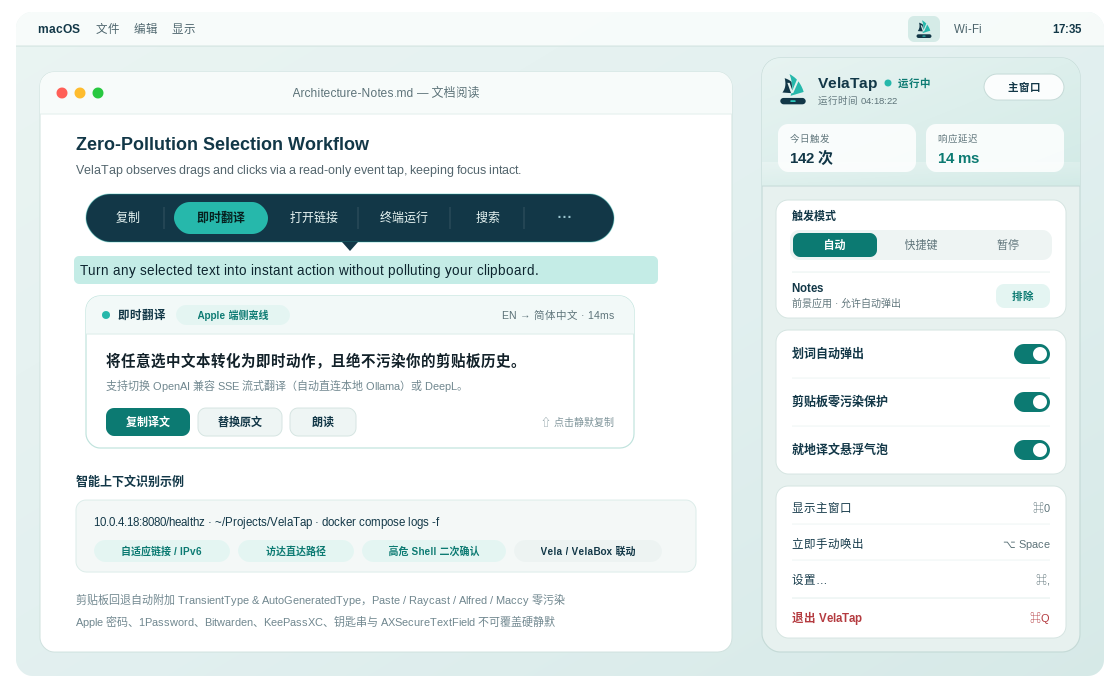
VelaTap 悬浮动作胶囊、原地即时翻译气泡与 320pt 菜单栏弹窗界面示意
VelaTap · 悬浮胶囊与菜单栏弹窗(界面示意)。选区上方浮现零焦点动作条,下方直接展开端侧/流式翻译气泡;菜单栏随时切换自动/快捷键/暂停模式或一键暂停当前应用。 VelaTap · Floating capsule & 320pt menu bar popover (illustration). Non-activating capsule floats above your selection with an inline translation bubble below, while the menu bar offers live metrics and quick mode switching.

核心能力What VelaTap does

每一次划选都在毫秒级完成上下文判定与零干扰呈现,把高频操作收拢到光标触手可及的一点。 Millisecond context detection and non-intrusive presentation bring your highest-frequency text workflows right to your cursor.

双通道捕获 · 高层级弹窗Dual-Channel · System Alerts

AX 直读优先、弹窗支持与零污染剪贴板AX Direct, Alert Support & Clean Clipboard

只读 .listenOnly CGEventTap 支持 4pt 拖选即刻弹出(默认 20ms 防抖)、双/三/四击、Shift+点击、Shift+方向键键盘选词、双击空白可编辑框唤出粘贴及 ⌥ Space 手动唤醒;通过真实目标 PID 解析与动态窗口层级抬升,连 macOS 系统 NSAlert 弹窗、LSUIElement 菜单栏代理与模态对话框中的选词也能稳定浮现。优先 AXUIElement 与 Copy-on-Select 直读,回退时无损快照并还原全 UTI,绝不污染 Paste / Raycast / Alfred / Maccy。 A read-only .listenOnly CGEventTap senses 4pt drags (20ms default debounce), multi-clicks, Shift+Click, Shift+Arrow, empty-field double-click Paste, and ⌥ Space. True target-PID resolution and dynamic window-layer elevation make popups work reliably even inside macOS NSAlert dialogs, LSUIElement agents, and modal sheets, while clipboard fallback restores every UTI with transient markers so clipboard managers stay spotless.

零焦点浮窗Non-Activating UI

多皮肤胶囊与两阶段渐进渲染5 Skins, 3 Modes & Instant Popup

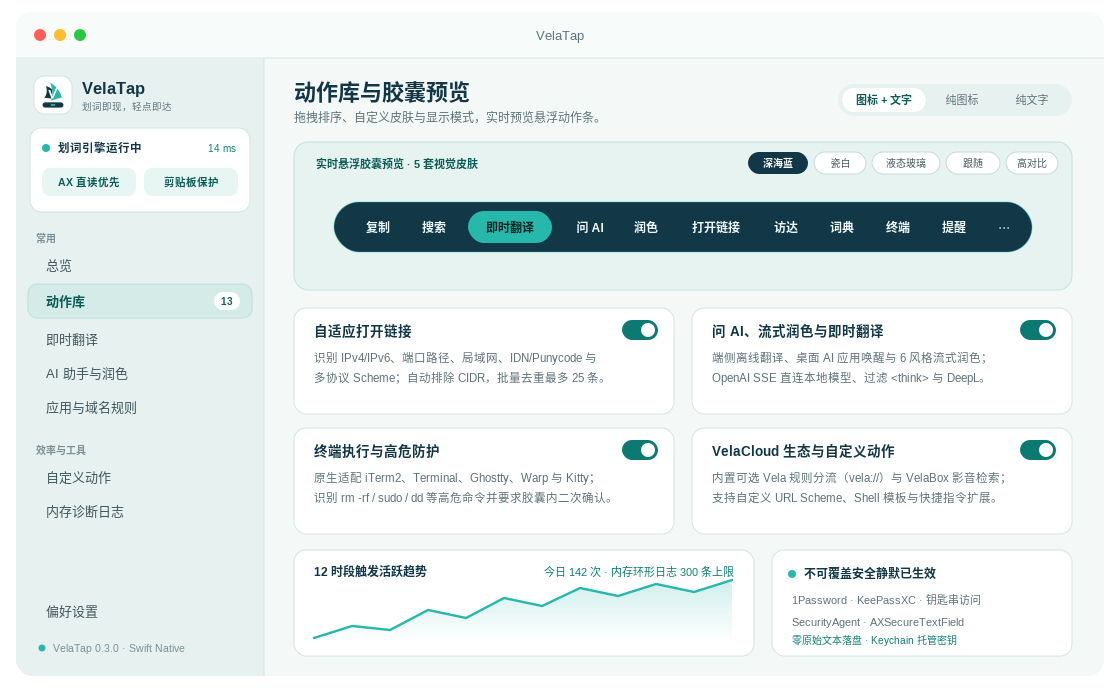
基于 .nonactivatingPanel 无边框浮窗,绝不抢占前台焦点或取消选区高亮,并采用两阶段渐进增强(先立即弹出胶囊,再异步补全拼写与词典项);默认精炼展示 5 项常用动作并自动前置拼写、链接、路径与 Shell 命令,其余收纳入 ··· 翻页。提供 5 套视觉皮肤、3 种尺寸与 3 种显示模式,自动避让刘海与 Dock 并支持触感反馈。 Built on .nonactivatingPanel so foreground focus and highlights stay untouched, with two-phase progressive enrichment (instant popup followed by async spelling/dictionary lookup). Keeps the capsule lean (5 visible actions by default with smart promotion for spelling, links, paths, and shell commands, plus ··· overflow), 5 skins, 3 sizes, 3 display modes, notch/Dock auto-flip, and haptics.

问 AI · 6 风格流式润色Ask AI · 6-Style Polish

桌面 AI 唤醒、流式问答与原地润色替换Ask AI & Streaming Text Polish

内置「问 AI」(自定义 AI 徽章):支持一键唤醒并无损粘贴到桌面 AI 应用(ChatGPT / Claude / 豆包 / Cherry Studio / 自定义 .app,可选 ⌘N 新对话与 ⌥ 切换自动发送)、网页 URL 模板(超长文本自动回退剪贴板)或原地流式 API 问答气泡。「AI 文本润色」提供自然、专业、精简、学术、纠错与自定义 6 种风格,在流式气泡内随时切换并一键无损替换原文(⌥ 自动替换 / ⇧ 直接复制)。 Ask AI (with custom capsule badge) supports waking and losslessly pasting into desktop AI apps (ChatGPT, Claude, Doubao, Cherry Studio, or any .app with optional ⌘N new chat & ⌥ auto-submit), web URL templates, or inline streaming Q&A. AI Text Polish offers 6 styles (natural, professional, concise, academic, proofread, custom) with inline style switching and lossless in-place replacement (⌥ auto-replace / ⇧ copy).

即时翻译 · 智能语境Inline Translate · Context

端侧离线翻译、流式 AI 与自适应链接On-Device Translate & Adaptive Links

即时翻译默认调用 macOS 15+ 端侧离线 Translation 框架(macOS 26+ 支持热会话缓存,复制/无损替换/朗读),并共用 OpenAI 兼容 SSE 流式客户端(实时过滤 <think> 标签、本机/局域网直连绕过代理)与 DeepL Free / Pro。纯 Swift UTF-8 检测引擎(50 KB 边界)同时识别 IPv4/IPv6(排除 CIDR)、局域网、IDN、多协议链接(最多批量打开 25 条)、本地路径与 Shell 命令。 Instant Translate defaults to macOS 15+ on-device Translation (warm session caching on macOS 26+, Copy/Replace/Speak) and shares an OpenAI-compatible SSE client (live <think> filtering, LAN/Ollama proxy bypass) plus DeepL Free/Pro. Pure-Swift UTF-8 detection (50 KB cap) also handles IPv4/IPv6 (excluding CIDR), LAN/IDN links (batch-open up to 25), local paths, and shell commands.

安全与规则Privacy & Rules

密码管理器硬静默与域名过滤Security Silence & App / Domain Rules

对 Apple 密码、1Password、Bitwarden、KeePassXC、LastPass、Enpass、Dashlane、Strongbox、钥匙串访问、SecurityAgent、loginwindow 与密码输入框(AXSecureTextField)实施不可覆盖的硬静默。支持按应用「排除 / 仅包含」双模式、浏览器精确/子域名过滤,默认排除 Figma 与虚拟机窗口,且绝不将选中文本落盘。 Enforces non-overridable security silence in Apple Passwords, 1Password, Bitwarden, KeePassXC, LastPass, Enpass, Dashlane, Strongbox, Keychain Access, SecurityAgent, loginwindow, and AXSecureTextField inputs. Supports Exclude/Include app lists, exact/subdomain browser filtering, default canvas/VM exclusions, and zero disk logging of selected text.

VelaCloud · Extensible

生态联动、自定义气泡与配置导出Ecosystem Hooks, Custom Actions & Backup

注册 velatap:// URL Scheme,内置可选 Vela 规则快捷分流(选中域名 / IP / CIDR 一键送入 vela://)与 VelaBox 影音检索;支持自定义 URL Scheme、Shell({{text}} 模板)与 Apple 快捷指令并直接在原地结果气泡展示输出(按住 ⌥ 静默复制),同时支持 JSON 配置导入/导出(自动剔除钥匙串密钥)。 Registers velatap:// with opt-in hooks for Vela routing rules (vela://) and VelaBox media search. Extend the capsule with custom URL schemes, Shell ({{text}}) templates, and Apple Shortcuts that display stdout in an inline output bubble (hold ⌥ to copy silently), plus JSON config import/export excluding Keychain API keys.


13 项原生动作与生态能力13 built-in native actions & integrations

按选区内容动态浮现并智能前置最相关动作,按住 ⇧ 或 ⌥ 可触发进阶变体动作,并可按习惯拖拽排序或切换显示形态。 Actions adapt automatically to what you select with smart promotion, ⇧ / ⌥ modifier variants, and drag-and-drop ordering.

13 项内置原生动作13 built-in native actions

复制Copy ⇧ Plain Text 剪切Cut Editable · ⇧ Plain 粘贴Paste Editable · ⇧ Plain 打开链接Open Link Up to 25 · ⌥ Copy URLs 访达定位Reveal in Finder Local & ~/ · ⌥ Terminal 拼写纠正Spelling NSSpellChecker Inline 系统词典Dictionary dict:// · ⇧ Copy Def 网页搜索Web Search 7 Presets + Custom *** 终端运行Run in Terminal Auto-Promoted · Danger 2-Tap · ⌥ Paste 提醒事项Reminders EventKit Direct 即时翻译Instant Translate Bubble · ⇧ Silent Copy 问 AIAsk AI Desktop App · Web · Inline Stream 文本润色AI Polish 6 Styles · ⌥ Auto-Replace · ⇧ Copy

支持的 AI 应用、终端、搜索引擎、翻译与联动AI targets, terminals, search, translation & hooks

Desktop AI ChatGPT · Claude · Doubao · Cherry Studio · Custom .app OpenAI-Compatible SSE · <think> Filter · LAN Direct Apple Translation On-Device · Warm Cache DeepL Free / Pro · Keychain iTerm2 Default New Tab Terminal · Ghostty · Warp · Kitty Google · Bing · DDG · 百度 · Kagi · GitHub · MDN Vela Rule Hook vela:// VelaBox Search Opt-In Custom Actions URL · Shell · Shortcuts Bubble

隐私边界与底层工程保障Privacy guarantees & engineering design

划词工具运行在全系统前台,因此把克制、低延迟与零数据泄露放在第一位。 Because a selection bar runs system-wide, restraint, low latency, and strict privacy come first.

PasteboardSnapshotter

全 UTI 无损快照与瞬态标记Lossless UTI Snapshot & Transient Tags

仅当目标应用不支持 Accessibility 直读时才触发剪贴板回退:先完整保存剪贴板中的富文本(RTF / HTML)、图片与文件引用,完成探测后即刻恢复原内容,并写入 org.nspasteboard.TransientType 与 AutoGeneratedType 标记,避免在剪贴板历史中留下杂音。 Clipboard fallback runs only when an app lacks Accessibility selection support: every NSPasteboardItem and raw UTI (RTF, HTML, images, file URLs) is snapshotted and restored immediately with TransientType and AutoGeneratedType markers.

Fail-Safe

11 类高危命令防误触与敏感应用硬静默11-Pattern Danger Guard & Hard Silence

在终端运行选中命令前,引擎会检测 rm -rf、sudo、mkfs、dd if=、diskutil erase、chmod -R 777 与管道脚本等 11 类高危模式,并在胶囊内强制二次点击确认。主流密码管理器与安全输入框的静默策略在核心层硬编码,无法被用户规则意外关闭。 Before executing commands in a terminal, 11 dangerous patterns including rm -rf, sudo, mkfs, dd if=, diskutil erase, chmod -R 777, and piped shells require an explicit second tap inside the capsule. Password-manager and secure-field silence is hard-coded in core policy.

Memory Only · Keychain

零选区落盘、配置备份与轻巧体积Zero Text on Disk & Safe JSON Backup

诊断日志仅驻留在固定 300 条内存环形缓冲区(MemoryLogRing)中,退出即清空,绝不把你划选的原始文本写入磁盘。BYOK AI 模型与翻译 API Key 独立托管在 macOS 钥匙串中,导出 JSON 配置备份时自动排除所有密钥;纯 SwiftPM Release 应用包小于 8 MB,支持 SMAppService 原生开机自启。 Diagnostics stay in a fixed 300-entry in-memory ring buffer (MemoryLogRing) and raw selected text is never written to disk. BYOK AI model and translation API keys live solely in macOS Keychain and are never included in JSON config exports; the pure-Swift bundle stays under 8 MB with native SMAppService login launch.

系统要求与技术规格Requirements & specifications

当前版本Current version v0.3.0
下载与自动更新Downloads & auto-update macOS 即将上线 · 官方镜像 https://download.velacloud.app/velatap/,内置自动更新读取 latest.json 并强制 SHA-256 校验。macOS Coming Soon · Official mirror https://download.velacloud.app/velatap/ with built-in latest.json SHA-256 verified auto-update.
系统要求System requirements macOS 15.0 或更高(依赖原生端侧 Translation 框架与最新 SwiftUI 特性)。macOS 15.0 or later (uses Apple’s native on-device Translation framework and modern SwiftUI APIs).
技术栈与体积Stack & footprint 100% 原生 SwiftPM + AppKit + SwiftUI,零 Electron、零第三方依赖;Release 应用包小于 8 MB(arm64 / Universal)。100% native SwiftPM + AppKit + SwiftUI with zero Electron and zero third-party dependencies; release app bundle under 8 MB (arm64 / Universal).
系统权限macOS permissions 需要辅助功能权限(AXIsProcessTrusted)用于划词感知与坐标直读;提醒事项(EventKit)与终端/浏览器自动化事件按需授权。Accessibility permission (AXIsProcessTrusted) for selection sensing and AX reading; Reminders (EventKit) and terminal/browser Apple Events requested only on demand.
快捷键与配置Shortcuts & config 全局唤醒默认 ⌥ Space(可自定义),菜单栏支持 ⌘0 / ⌘, / ⌘Q;注册 velatap:// URL Scheme,支持 JSON 配置导入/导出(不含钥匙串密钥)及内置中英双语界面。Customizable global hotkey (default ⌥ Space), menu bar shortcuts (⌘0 / ⌘, / ⌘Q), registered velatap:// URL scheme, JSON config import/export (excluding Keychain keys), and built-in zh-Hans / en UI.

获取 VelaTap 与建议反馈Get VelaTap & send feedback

来信请附上你的 macOS 版本,以及希望适配的常用应用、终端、AI 助手或动作场景。请将你的 AI 与翻译 API Key 留在本地设备上。 Include your macOS version and any apps, terminals, AI tools, or custom action workflows you’d love to see supported. Keep your AI and translation API keys on your own Mac.